Search This Blog

Tuesday, May 18, 2010

YouTube, at age 5..

It’s spawned scandals, spoofs and sensations and is probably the biggest time waster on the planet.
But as video—sharing internet site YouTube celebrated its fifth birthday on Monday, all the signs were that it’s just getting started.
The site, which uploaded its first video in May 2005, now boasts 2 billion video views per day, and according to industry experts could soon dominate the future of television.
Google, which bought You Tube in October 2006 for 1.65 billion dollars, hopes those predictions come true. Even though the internet giant is focusing its famous brainpower and cash reserves to make sure it happens sooner rather than later, success may prove elusive.
YouTube users already post more than 24 hours of video content every minute, and the site is the third—most heavily—trafficked on the Internet, according to Google. But the average YouTuber spends only 15 minutes a day on the site, compared to the five hours that are spent watching television, and the key challenge for YouTube is to close that time gap.
YouTube is adding rental capabilities for full—length movies, two— hour concerts and live sporting events in a bid to attract more high quality content to its line—up. 
That can mean big money for the few videos that go viral, like David After Dentist. This is the snippet of footage that shows a disoriented child still groggy after his dental treatment, asking his father on the car ride home: “Is this real life?” That video has been viewed more than 59 million times and still attracts more than 100,000 views a day, earning his family more than 125,000 dollars.
Ultimately, though, YouTube will need much more professional content, in order to keep viewers around longer and to give advertisers quality footage with which to associate their products.
Hollywood and Google are working hard on their relationship, which kicked off badly due to fears that YouTube was simply going to pirate all of Hollywood’s content. Even as YouTube is still fighting a bitter, 1—billion—dollar lawsuit from media conglomerate Viacom, it is gradually building a strong relationship with other major content creators.
“The relationship isn’t completely repaired, but they’ve come a long way,” said media analyst Will Richmond. “Hollywood recognizes the juggernaut that YouTube is.” Bob Thompson, a professor of popular culture at the University of Syracuse, is stunned at YouTube’s rapid rise, but points out that five years from now it may be usurped by another quick riser, just like MySpace lost out to Facebook. also points out that for all its billions of video views, YouTube is still far less successful at creating cultural touchstones than the old television medium.
“The turnover is so rapid, the amount of memorable stuff that lives on is very small,” he stays. “It comes and goes at an alarmingly fickle rate. It’s totally ephemeral.”
 

Sunday, May 16, 2010

Win XP SP2 support to cease in two months

Overtime looms for developers and sys admins alike in the run-up to Microsoft's plans to stop supporting Windows XP SP2 and Windows 2000 from 13 July.

The many enterprise users still running XP desktops, often tied to proprietary software, have two months to upgrade to windows XP SP3 if they want security patches and support.
Microsoft’s Extended Support for XP runs until April 8, 2014, at which point the operating system will finally be put out to pasture. By that point the operating system, released in August 2001, will be approaching 13 years old.

Patches and support for Windows 2000 (desktop and server) also cease on 13 July. Microsoft advises users to upgrade to Windows 7, Windows Server 2003, Windows Server 2008.
Windows XP SP2 (released in 2004) turned on a built-in firewall bundled with the operating system by default, helping to thwart the spread of internet worms such as Blaster and Nimda which caused all sort of problems in the early noughties.

Vulnerability scanning firm Qualys reckons 50 per cent of Windows XP machines in enterprise land are running SP2, USA Today reports, so the task ahead will be huge.
Microsoft's line on the upcoming end of support for Windows XP SP2 can be found here.

Thursday, May 13, 2010

How to hide files in JPEG files


If you’re looking to hide files on your PC hard drive, you may have read about ways to encrypt folders or change the attributes on a file so that they cannot be accessed by prying eyes. However, a lot of times hiding files or folders in that way requires that you install some sort of software on your computer, which could then be spotted by someone else.
I’ve actually written quite a few articles on how you can hide files and folders in Windows XP and Vista before, but here I’m going to show you a new way to hide files that is very counter-intuitive and therefore pretty safe! Using a simple trick in Windows, you can actually hide a file inside of the JPG picture file!
You can actually hide any type of file inside of an image file, including txt, exe, mp3, avi, or whatever else. Not only that, you can actually store many files inside of single JPG file, not just one! This can come in very handy if you need to hide files and don’t want to bother with encryption and all that other technical stuff.

Hide File in Picture

In order to accomplish this task, you will need to have either WinZip or WinRAR installed on your computer. You can download either of these two off the Internet and use them without having to pay anything. Here are the steps for creating your hidden stash:
  • Create a folder on your hard drive, i.e. C:\Test and put in all of the files that you want to hide into that folder. Also, place the image that you will be using to hide the files in.


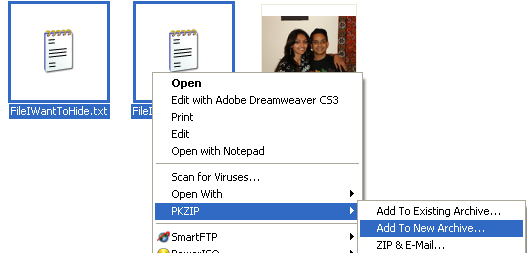
  • Now select all of the files that you want to hide, right-click on them, and choose the option to add them to a compressed ZIP or RAR file. Only select the files you want to hide, not the picture. Name it whatever you want, i,e. “Hidden.rar”.


  • Now you should have a folder that looks something like this with files, a JPG image, and a compressed archive:


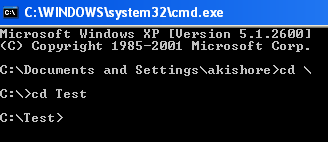
  • Now here’s the fun part! Click on Start, and then click on Run. Type in “CMD” without the quotes and press Enter. You should now see the command prompt window open. Type in “CD \” to get to the root directory. Then type CD and the directory name that you created, i.e. “CD Test“.


  • Now type in the following line: “copy /b DSC06578.JPG + Hidden.rar DSC06578.jpg” and press Enter. Do not use the quotes. You should get a response like below:


Just make sure that you check the file extension on the compressed file, whether it is .ZIP or .RAR as you have to type out the entire file name with extension in the command. I have heard that some people say that they have had problems doing this with a .ZIP extension, so if that doesn’t work, make sure to compress to a .RAR file.
And that’s it! The picture file will have been updated with the compressed archive inside! You can actually check the file size of the picture and see that it has increased by the same amount as the size of the archive.
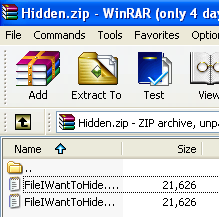
You can access your hidden file in two ways. Firstly, simply change the extension to .RAR and open the file using WinRAR. Secondly, you can just right-click on the JPG image and choose Open With and then scroll down to WinRAR. Either way, you’ll see your hidden files show up that you can then extract out.


That’s it! That is all it takes to hide files inside JPG picture files! It’s a great way simply because not many people know it’s possible and no one even thinks about a picture as having to the ability to “hide” files. Enjoy!

Watch DivX Hollywood/Bollywood movies online

Stream DivX Hollywood/Bollywood movies online for free


In the mood to watch a full movie online for free? You can use Joox.net to watch Hollywood, Hindi, Anime, Cartoons, TV Shows, Music videos, Documentaries, and foreign movies streaming online with subtitles for free! The site does not actually host any videos itself, but instead bookmarks videos from the site Stage6, which is a video sharing site like YouTube, but for high resolution DivX videos.

In order to watch the videos on Joox.net, you will need to install the DivX plugin from Stage6. Of course, since some stuff may by copyrighted, Stage6 will remove it and it may not work on this site. However, from playing around with it, all of the movies I’ve played so far work fine. The resolution in very high and you can even watch them full screen.It doesn’t have the latest movies or anything like that, but if you’re in the mood for Casino (1995), The Man Who Knew Too Much (1934), Psycho (1960), or Schindler’s List, then this is the place to go. Also, I liked their selection of Bollywood movies and comedy/stand-up videos.
You can also download the videos to your computer if you life. And if you know how to create DivX files, you can upload them yourself by creating an account on Stage6. Of course, you can also go to Stage6 itself and watch a host of other high resolution movies and videos there.

Stage6 has many more categories and allows for search by tags or lookup through “channels”, such as Anime, move trailers, music videos, etc. Using Stage6, you can download videos for playback on your computer, TV, or portable media player like the iPod, etc. Lots of free video at very high quality! Enjoy!